ReliefBooks vs. QuickBooks: Why General Accounting Software Falls Short for Relief Vets
QuickBooks wasn't built for shift-based relief work. See how ReliefBooks' purpose-built features — the Payer Triangle, shift scheduling, facility CRM, automatic mileage, and tax tools — compare against a generic accounting app.
Someone in your Facebook group told you to "just use QuickBooks." Your CPA nodded along. So you signed up, stared at the dashboard for twenty minutes, and tried to figure out how to log a shift at a clinic you drove 90 minutes to — a shift that was booked through an agency but performed at a different clinic entirely.
You couldn't. Because QuickBooks doesn't know what a shift is.
QuickBooks is excellent software. It powers millions of businesses. But relief work is not a typical business, and the tools built for typical businesses leave relief professionals patching together spreadsheets, calendar apps, and mileage trackers just to answer a simple question: What did I actually earn today?
Relief Work Has a Shape That QuickBooks Doesn't Recognize
Every relief professional operates inside what we call The Triangle:
You — the independent contractor running a business of one
The Clinic — the physical location where you show up and do the work
The Agency — the platform or staffing company that booked you and pays you
This three-party relationship is the defining feature of relief work, and no general accounting tool was built to handle it. QuickBooks sees "customers" and "vendors." It doesn't understand that the place you work and the entity that pays you are often completely different.
That single gap cascades into every part of your bookkeeping:
Invoices get addressed to the wrong entity
Mileage is tracked globally instead of per-shift to a specific clinic
Expenses can't be linked to a specific day at a specific location
You can't see at a glance how much you've earned from each agency versus each clinic
Where You Work vs. Who Pays You
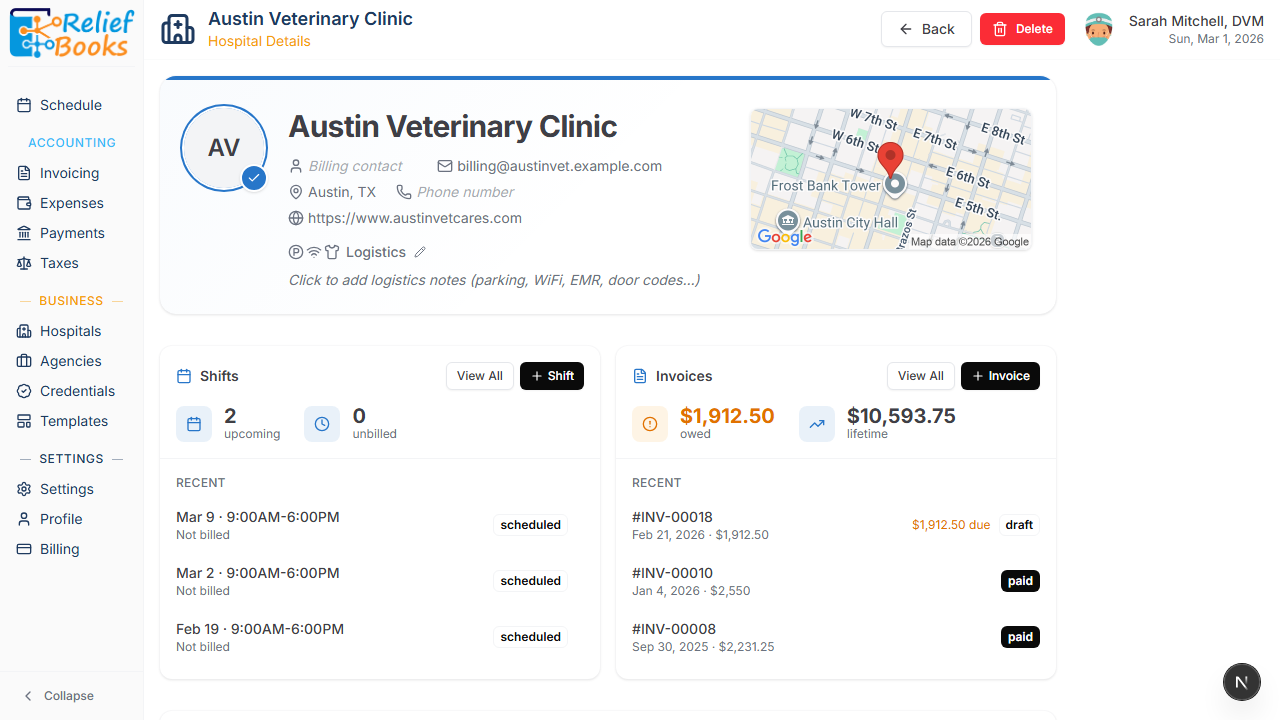
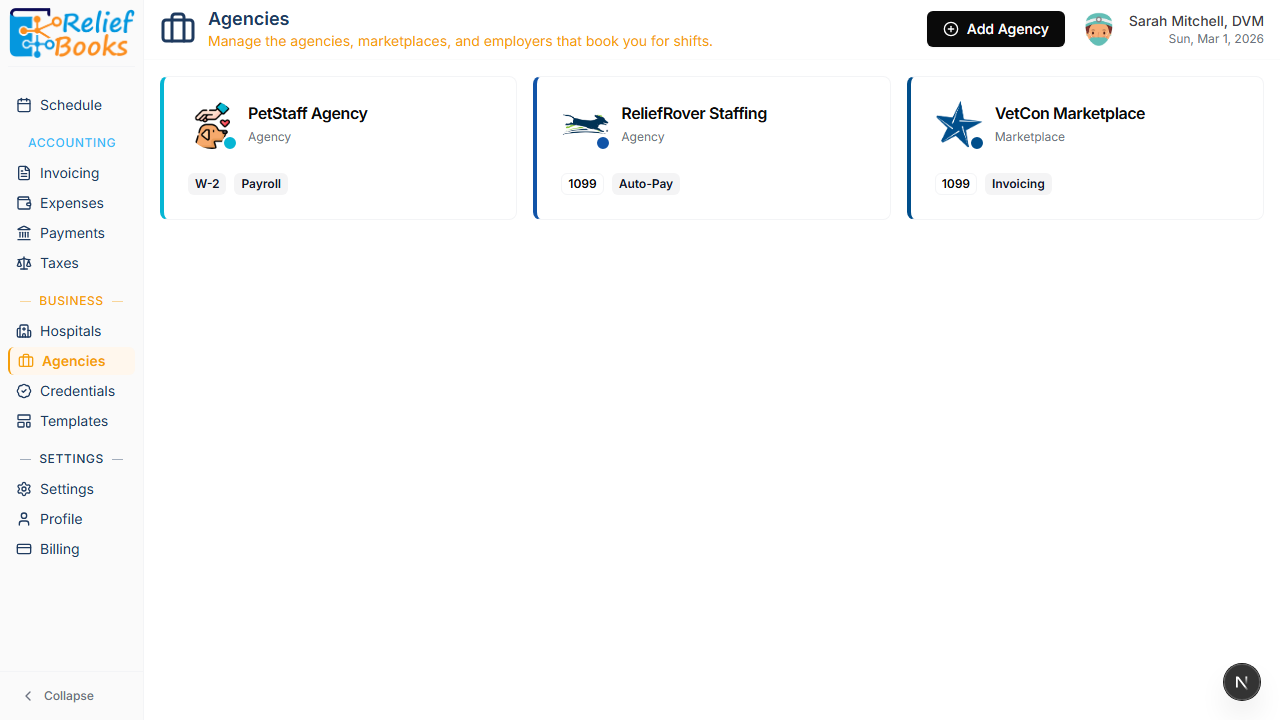
In ReliefBooks, you set up your Facilities (the clinics where you work) and your Agencies (the booking sources that pay you) as separate entities. When you log a shift, you link both — the facility you drove to and the agency that will pay for it.
Each facility stores everything you need: the billing contact, physical address with a map, and a full history of your shifts and invoices at that location. You can add logistics notes — parking instructions, Wi-Fi passwords, door codes, which EMR system they use — so you're never scrambling in the parking lot before a shift.
In QuickBooks, you'd need to manually maintain this using custom fields, classes, or projects. None of it would flow through to your invoices automatically. And there's certainly no place to store the clinic's door code.
Your agencies are managed separately, each with their payment type clearly labeled. PetStaff pays you on W-2 with payroll. ReliefRover is 1099 with auto-pay. VetCon is 1099 and you invoice them. This distinction matters at tax time — and ReliefBooks tracks it from day one.
Your Schedule Is Your Business
Relief work is shift-based, not project-based. Your calendar isn't just a scheduling tool — it's your general ledger. Every dollar you earn starts as a shift on a specific day at a specific clinic.
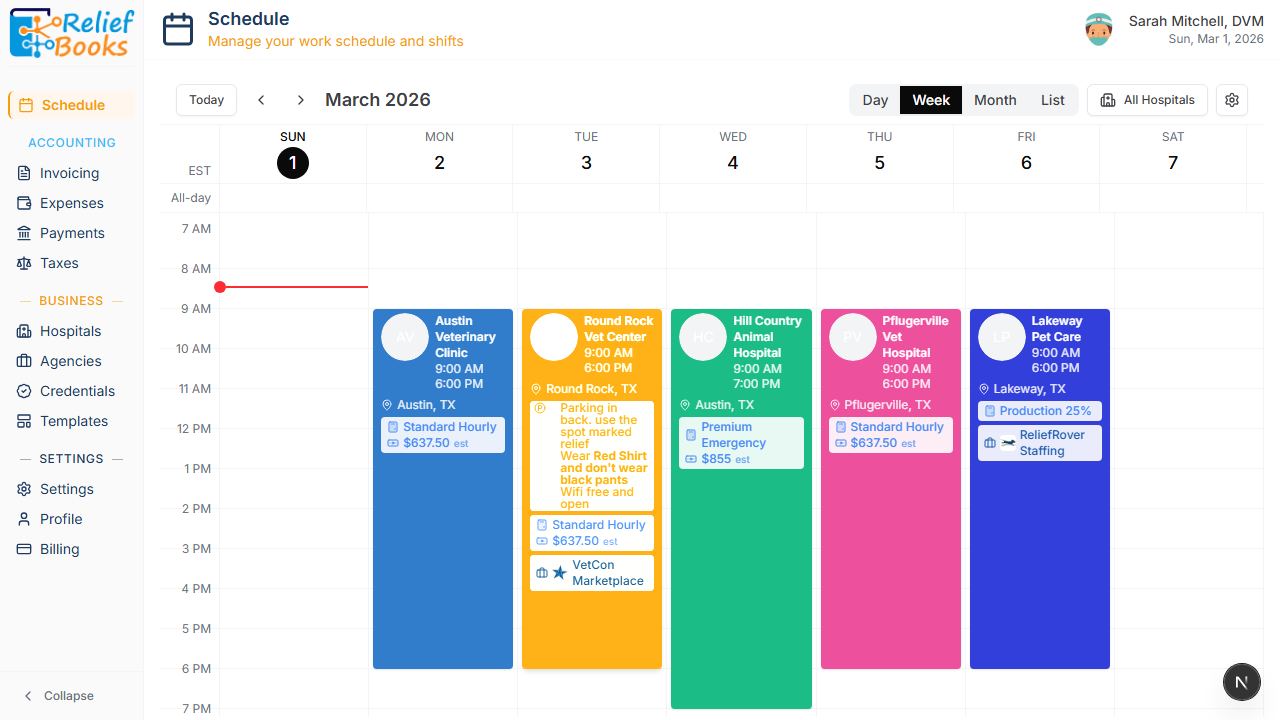
ReliefBooks gives you a unified calendar where every shift is color-coded by facility. At a glance, you can see where you're working, what you're earning, who booked you, and even logistics notes for each clinic. The schedule shows your rate card and estimated earnings right on the shift block.
QuickBooks has no scheduling capability at all. To replicate this, you'd need Google Calendar for dates, a separate mileage app for drive distances, and a spreadsheet to track which agency booked which shift. Then you'd manually reconcile all three systems every time you create an invoice.
From Shift to Invoice in One Click
This is where the gap becomes a chasm.
In QuickBooks, creating an invoice means opening a blank form, selecting a customer, manually entering line items, looking up your rate, calculating hours, and hoping you remembered to bill for the right dates. If you worked six shifts for an agency last month, you're doing that math yourself.
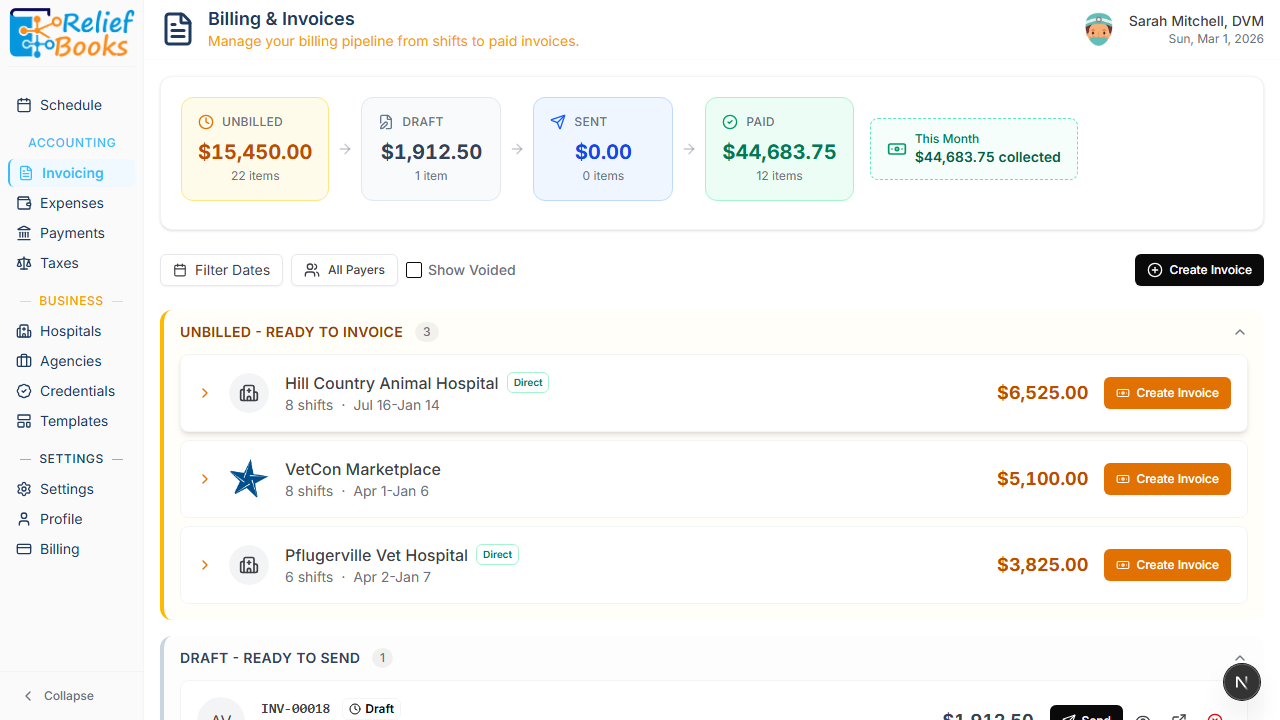
In ReliefBooks, unbilled shifts flow automatically into a billing pipeline. The Unbilled column shows you exactly how much money is sitting on the table — grouped by payer, with a "Create Invoice" button that pre-populates everything: the correct payer, line items from your rate card, shift dates, applicable taxes, and mileage charges. You review it, click send, and move on.
The pipeline view (Unbilled, Draft, Sent, Paid) gives you a complete picture of your accounts receivable at all times. You always know how much you've earned, how much you've billed, and how much you're still waiting on.
Expense Tracking That Speaks Schedule C
QuickBooks organizes expenses into generic business categories — Office Supplies, Travel, Utilities. These categories don't map directly to the IRS Schedule C form that every independent contractor files.
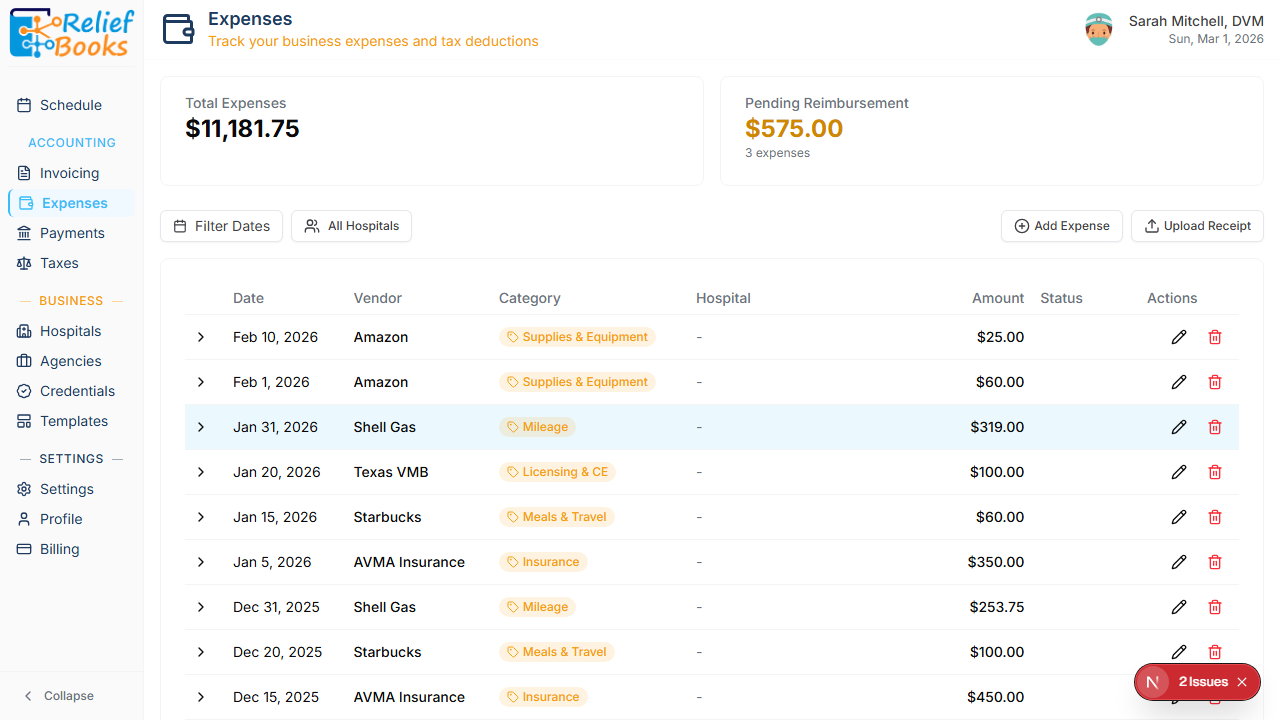
ReliefBooks categorizes your expenses using Schedule C-aligned categories from the start: Mileage, Meals & Travel, Licensing & CE, Insurance, Supplies & Equipment. When tax season arrives, your expenses are already organized the way your CPA needs them.
The system also tracks pending reimbursements — expenses that a clinic owes you — and can roll them into your next invoice automatically. In QuickBooks, you'd track reimbursable expenses and billable invoices in completely separate workflows.
Tax Tools Built for Independent Contractors
QuickBooks gives you a Profit & Loss report. That's useful, but for an independent contractor juggling multiple states, multiple payers, and quarterly estimated payments, it's about 20% of what you actually need.
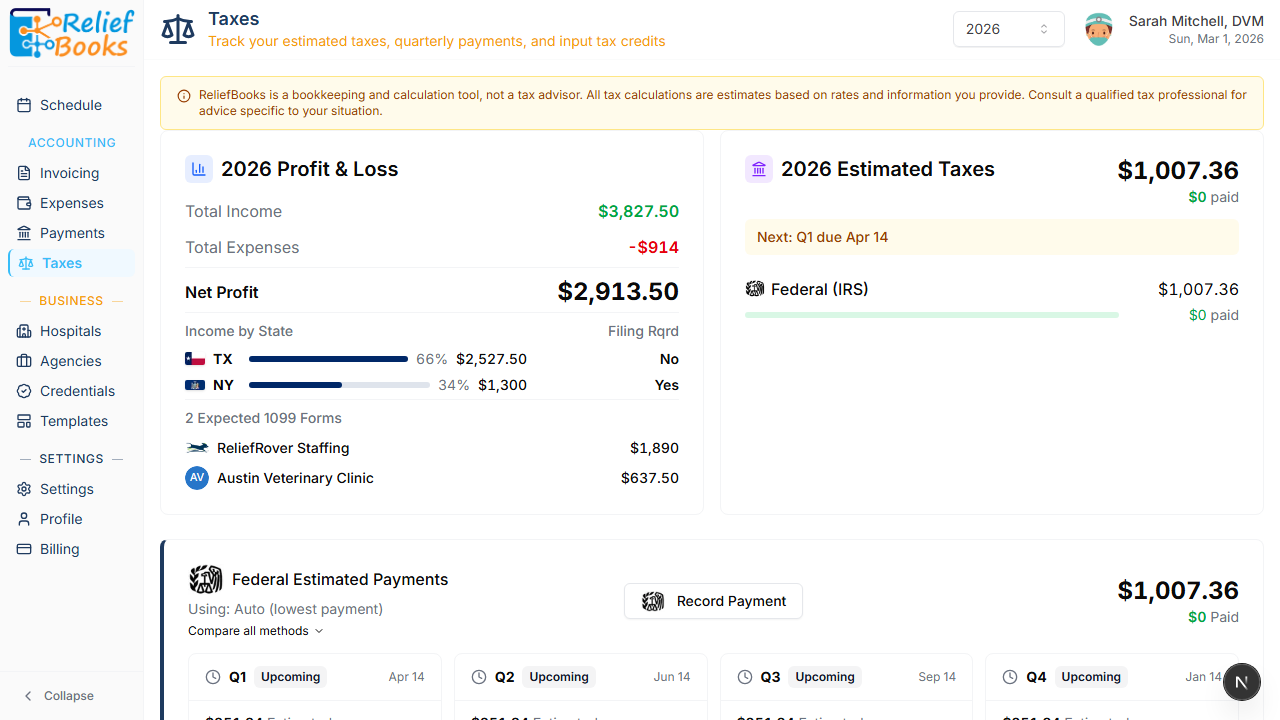
ReliefBooks provides a purpose-built tax dashboard:
Profit & Loss with income, expenses, and net profit for the year
Income by State showing which states you earned in and whether you have a filing requirement — critical for relief vets who cross state lines
Expected 1099 Forms listing each payer and how much they should report, so you can verify the 1099s you receive are accurate
Estimated Tax Obligations calculating your federal (and state) liability based on your actual earnings
Quarterly Payment Schedule with due dates and amounts for Q1 through Q4, so you're never surprised by a tax bill
None of these exist in QuickBooks. You'd need a CPA to calculate quarterly estimates and a spreadsheet to track multi-state income.
Everything in One Dashboard
The core promise of ReliefBooks is that you stop stitching together five tools and start using one.
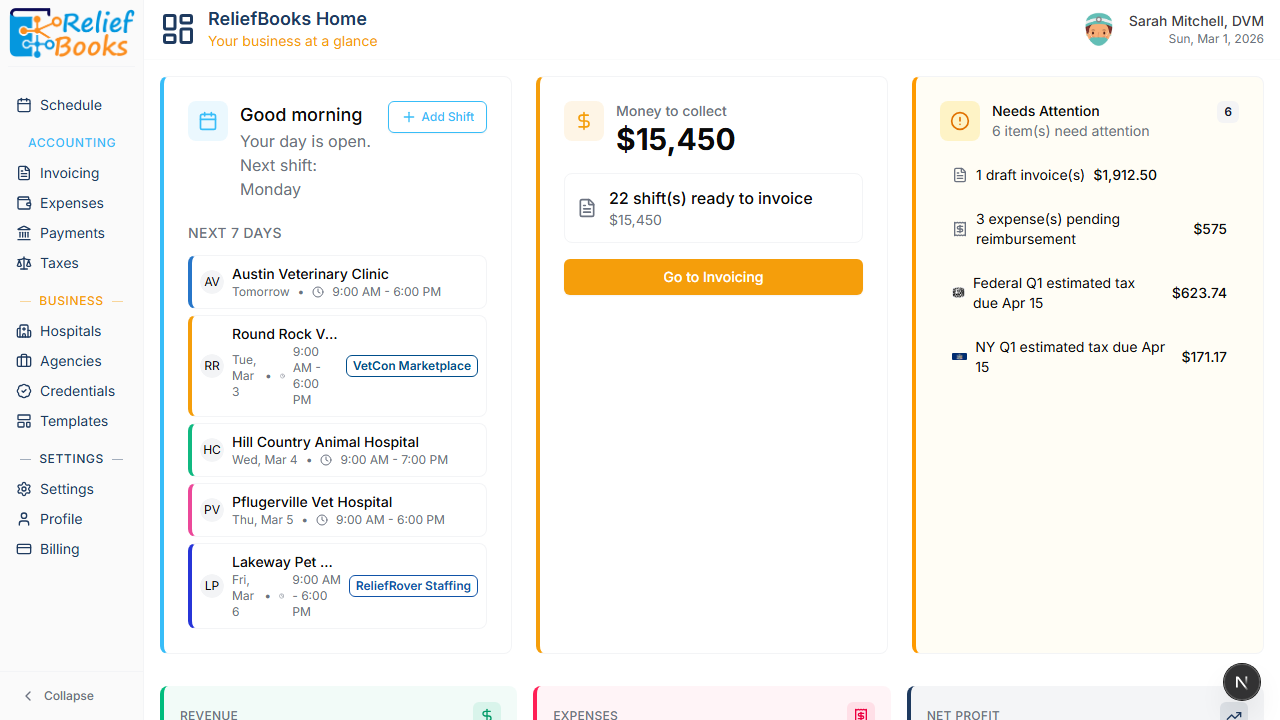
Your dashboard shows the week ahead, the money owed to you, and everything that needs your attention — draft invoices, overdue invoices, pending reimbursements, upcoming tax deadlines — in a single view. Below that, revenue and expense trends so you can see how your business is tracking month over month.
The Honest Comparison
Feature
QuickBooks
ReliefBooks
Payer Triangle (Clinic vs. Agency)
No
Yes
Shift-based scheduling
No
Yes
Facility CRM (contacts, logistics, notes)
No
Yes
Automatic mileage per shift
No
Yes
One-click invoicing from shifts
No
Yes
Billing pipeline (Unbilled to Paid)
No
Yes
Schedule C expense categories
Partial
Yes
Reimbursable expense tracking
Manual
Automatic
Multi-state income tracking
No
Yes
Quarterly tax estimates
No
Yes
Expected 1099 verification
No
Yes
Agency/booking source management
No
Yes
Credential & license tracking
No
Yes
General double-entry bookkeeping
Yes
Focused on relief work
Payroll for employees
Yes
N/A (you're 1099)
Inventory management
Yes
N/A
When QuickBooks Is the Right Choice (and When It's Not)
QuickBooks is the right tool if you run a traditional veterinary practice with employees, inventory, and payroll. It's battle-tested software that millions of businesses rely on for good reason.
But if you're a relief professional — an independent contractor working shifts at multiple facilities, booked through multiple agencies, driving different routes every day, and managing your own taxes — QuickBooks solves about 20% of your problem. For the other 80%, you're back to spreadsheets.
This article is for informational purposes only and does not constitute an endorsement or criticism of any specific software product. Feature comparisons reflect publicly available information as of March 2026.

 Kal Saad